
I get asked some version of this question almost every week. We are about to rebuild our site, should it be WordPress or should it be something like Next.js? Usually the person asking has already had the debate framed for them as a popularity contest, or a cost argument, or a "what does my agency know" argument.
None of those are the real question. The real question is how do you want a page to be built, because WordPress and Next.js answer that completely differently, and for the kind of image-heavy sites tourism brands need, the difference is the whole game. My honest answer, after building on both, is that for tourism a pre-rendered framework like Next.js wins more often than not.
So this is the technical version of that answer, with the trade-offs laid out honestly rather than as a sales pitch. I will give WordPress a fair hearing, including the one argument people lean on hardest, its plugin flexibility, and explain why that argument has quietly weakened.
It is a rendering-model decision, not a logo decision
WordPress and Next.js are not really competing on the same axis. WordPress is a content management system that, by default, assembles each page on the server at the moment it is requested. Next.js is a framework that lets you decide, per page, when the HTML is built: ahead of time, on the edge, or on demand.
That single difference, when the HTML comes into existence, drives almost everything else: how fast the first byte arrives, how the site behaves under load, how predictable performance is as you add content, and how much machinery has to run for an anonymous visitor to see a photo.
How WordPress builds a page
A classic WordPress request goes through a lot of moving parts before the browser sees anything.
The visitor hits your server. PHP wakes up, loads WordPress core, then loads every active plugin and the theme. It opens connections to a MySQL database and runs a series of queries to fetch the post, its metadata, the menu, the widgets, and whatever each plugin wants to add. The theme stitches all of that into an HTML string, and only then does the response start streaming back.
This is flexible and it is why WordPress runs a huge share of the web. But notice that this work, in the naive case, happens on every request. The standard fix is to bolt caching on top: a page-cache plugin, an object cache, a reverse proxy, or a CDN in front. Done well, that turns most requests into cached responses and WordPress can be genuinely fast. The catch is that caching is something you add and maintain, and image-heavy, frequently-updated pages are exactly the ones that are hardest to cache cleanly.
How Next.js builds a page
Next.js inverts the default. Instead of assembling the page when it is asked for, you can build it ahead of time and serve the finished HTML from a CDN edge close to the user. For content that does change, you can revalidate it in the background or render only the dynamic parts on demand.
In practice that means an anonymous visitor to a tourism landing page can be served pre-rendered HTML from an edge node, with no PHP process, no plugin chain, and no database round trip on the critical path. The dynamic, personalised, or admin-only work is isolated to the few places that genuinely need it, instead of running for everyone.
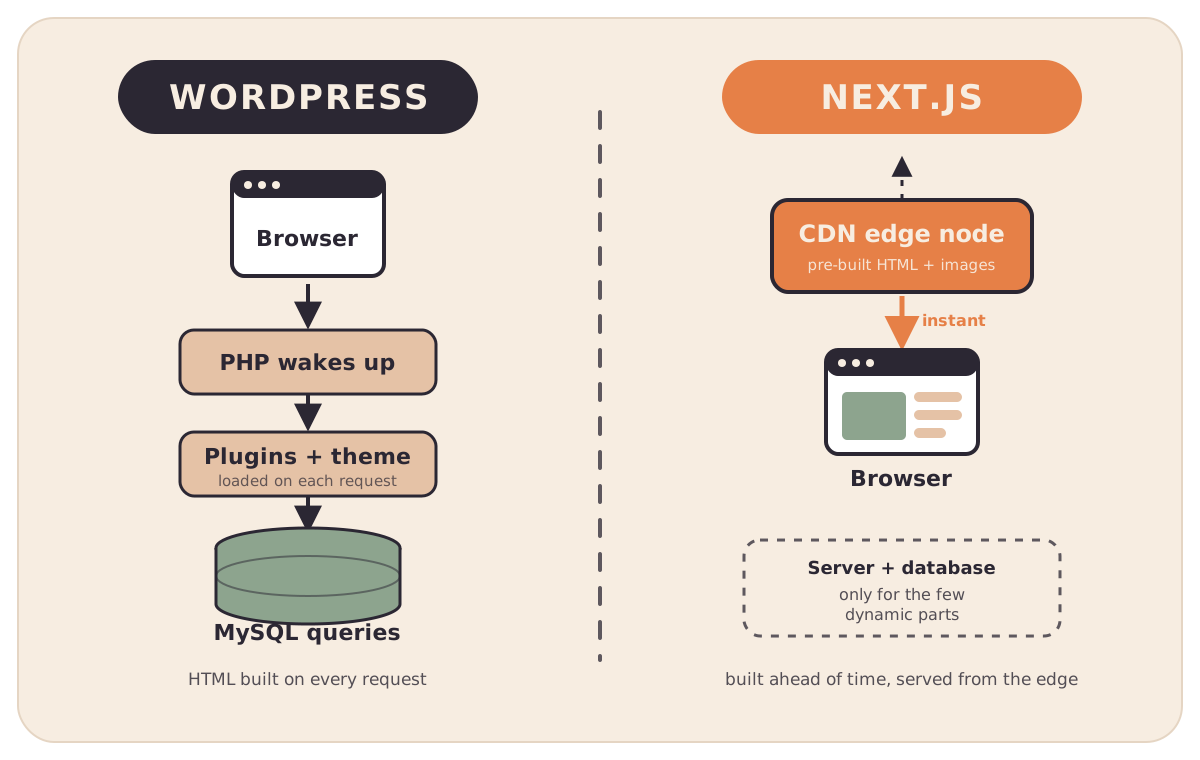
The headline is not "Next.js is faster." A well-cached WordPress site can serve a cached page very quickly too. The headline is that Next.js makes the fast path the default and pushes the expensive work to the edges, whereas WordPress makes the dynamic path the default and asks you to cache your way back to fast.
Where this actually bites: image-heavy pages
For most of the web, this stays an academic distinction. For tourism it does not, because our pages are not mostly text with a hero image. They are galleries. Itineraries with a photo per day. Landing pages that try to make someone feel a place, which means lots of large, high-quality visuals.
That is the scenario where the two models diverge hardest. On a page-rendered, plugin-driven stack, adding more images tends to pile on more work: more media queries, more metadata lookups, more plugin processing, more bytes squeezed through resizing on the fly, and more pressure on whatever cache you have bolted on. Response time tends to climb as the page gets richer, and it climbs fastest under real traffic.
A pre-rendered, CDN-served, image-pipeline approach is built to stay flat. The HTML is already built. The images are pre-processed into the right variants, preloaded for the viewport that needs them, and served from object storage through a CDN rather than resized per request. Adding the fiftieth photo costs roughly the same as the fifth.
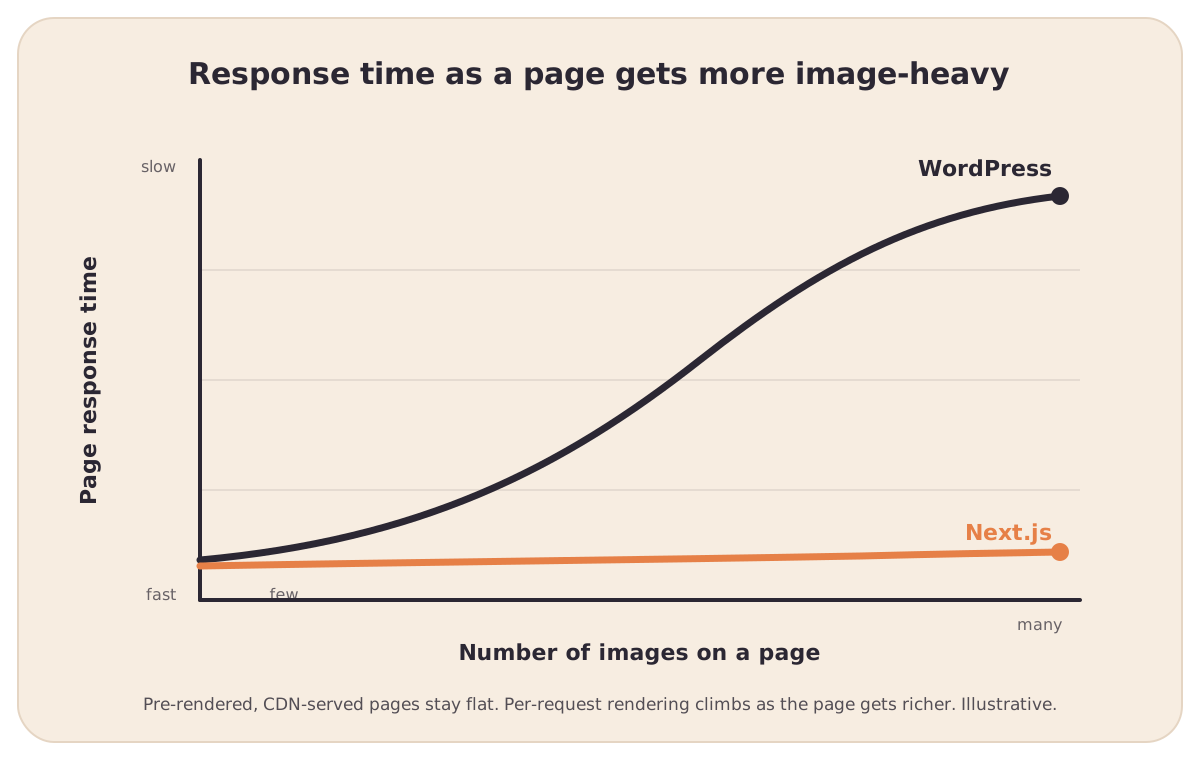
This is the part I care about most, because it is the exact gap between a website that looks as alive as your Instagram feed and one that gets slower every time you try to make it richer.
The fair case for WordPress
I am not here to pretend WordPress is the wrong answer for everyone. It genuinely is the right answer for a lot of projects, and the trade-offs cut both ways.
- Editing and ecosystem. Non-technical teams can publish comfortably, and there is a plugin for almost anything, which means less custom code for common needs.
- Lower starting effort. For a small, mostly-static brochure site that rarely changes, a cached WordPress theme is quick to stand up and cheap to run.
- Familiarity. Most agencies know it, so it is easy to find someone to maintain it.
WordPress only becomes a liability when you push it toward exactly the thing tourism needs: large volumes of imagery, frequent updates, and pages engineered to convert. That is when the bolt-on caching, the plugin sprawl, and the per-request rendering start working against you.
The plugin argument, and why AI changes it
If you push on why people reach for WordPress, you almost always land on the same word: flexibility. Need a booking form, a gallery, a reviews widget, a multi-language switcher, an SEO panel? There is a plugin for that. You install it, configure it, and the feature appears without anyone writing code.
That used to be a decisive advantage, and it is the single strongest case for WordPress. But it is worth being precise about what that flexibility actually is. A plugin is someone else's generic code, written for thousands of sites, that you bend toward your specific need. It brings its own database tables, its own assets, its own update cycle, and its own performance cost, and you stack ten or twenty of them to assemble a site. The flexibility is real, but you are renting it, and you inherit everything that comes with it.
Here is what has shifted. The reason custom features were expensive, and the reason plugins existed at all, was that writing bespoke code took specialist time. That premise is breaking. With AI now native to how we build, the gap between "install a generic plugin" and "build the exact feature you need" has collapsed. On a modern framework you can generate a booking widget, a gallery layout, or a custom itinerary component that does precisely what your tour needs, integrated directly into the codebase, with no extra plugin runtime bolted on top and no per-request weight added for every visitor.
So the flexibility WordPress sells through its plugin ecosystem is no longer something only WordPress can offer. You can have tailor-made features and a pre-rendered, fast architecture at the same time, because building the custom thing is no longer the slow, costly path it once was. The plugin model solved a problem that AI-native development is steadily dissolving.
It is not really CMS versus code
Here is the part the framing usually misses. Choosing a pre-rendered architecture does not mean giving up easy editing. Those two things are independent.
On our own platform, content is editable in place, directly on the live page, by people who never touch code, and it is still served as fast pre-rendered HTML with an image pipeline underneath. You get the editing comfort that draws people to WordPress without inheriting the per-request rendering model that makes image-heavy WordPress sites slow. The lesson is that "easy to edit" and "rebuilt on every request" were never the same requirement; WordPress just happened to ship them together.
My position
If you are building a small site that rarely changes and is mostly words, WordPress is a perfectly reasonable choice and the debate barely matters.
But if you are a tourism brand whose entire job is to sell a feeling through dozens of large images, on pages you intend to update often and optimise for conversion, then Next.js is the better bet. A pre-rendered, edge-served, image-first architecture keeps those pages fast as they get richer, and "fast as they get richer" is precisely what an image-led tourism site lives or dies by. The one thing that used to pull the decision back toward WordPress, its plugin flexibility, is exactly the thing AI-native development now lets you match without giving up speed.
The question was never really WordPress or Next.js. It was whether your pages are built once and served instantly, or rebuilt every time someone wants to look at your photos, and whether the flexibility you need has to be rented from a plugin or can simply be built.
This is the architecture we chose for the Proudback platform for exactly these reasons, and it is why our pages can be both genuinely editable and genuinely fast under heavy imagery. If you are weighing up a rebuild and want to talk through which model actually fits your site, arrange a 30-minute call with us and we will walk through it with your real pages in mind.